

Description
I2C LCD 16×2 Display Module for Arduino – The Perfect Choice for Your DIY Projects
Table of Contents:
- Introduction to the I2C LCD 16×2 Display Module for Arduino
- Why Choose the I2C LCD 16×2 Display Module?
- Key Features of the I2C LCD 16×2 Display Module
- How to Use the I2C LCD 16×2 Display Module with Arduino
- Applications of the I2C LCD 16×2 Display Module
- FAQs about the I2C LCD 16×2 Display Module for Arduino
- Conclusion: Elevate Your Projects with the I2C LCD 16×2
Introduction to the I2C LCD 16×2 Display Module for Arduino
The I2C LCD 16×2 Display Module for Arduino is an essential tool for makers and engineers looking to integrate a clear and compact display into their projects. Whether you’re a beginner or an experienced Arduino enthusiast, this module simplifies the process of displaying data and enhances the overall user experience.
Designed to reduce the number of pins needed for interfacing with your microcontroller, the I2C LCD 16×2 Display Module is perfect for projects where you need to save on pin usage while keeping things visually appealing. Let’s dive into the features, setup, and applications of this handy display module.
Why Choose the I2C LCD 16×2 Display Module?
The I2C LCD 16×2 Display Module offers several advantages over other display modules, making it an ideal choice for various Arduino and microcontroller projects. Here’s why you should consider it:
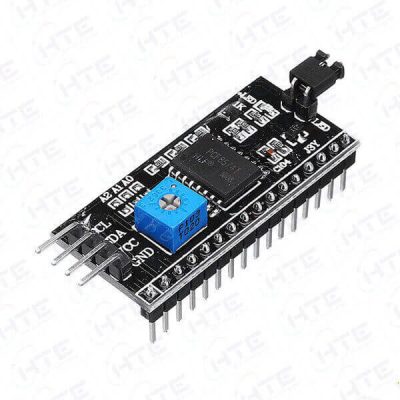
- Reduced Pin Usage: Thanks to the I2C interface, you only need two wires (SDA and SCL) to connect the display, freeing up GPIO pins for other components.
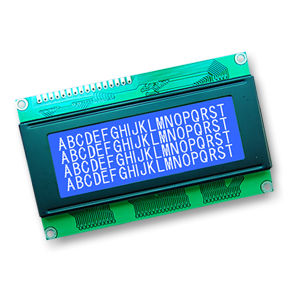
- Clear Display: The 16×2 character display provides ample room to showcase important data, messages, or real-time readings.
- Easy Integration: With a simple library and wiring, the I2C LCD module is easy to set up and start using right away.
- Compatibility: It’s compatible with a wide range of microcontrollers, especially Arduino.
If you’re looking for a simple and efficient way to add text displays to your project without using too many pins, this module is your go-to solution.
Key Features of the I2C LCD 16×2 Display Module
- 16×2 Character Display: Displays up to 16 characters per line, with 2 lines total.
- I2C Interface: Utilizes I2C communication, requiring only two pins for data transfer.
- Adjustable Backlight: Features an adjustable backlight to ensure visibility in different lighting conditions.
- Compact Size: Small and lightweight, making it suitable for a variety of projects, from portable devices to home automation systems.
- Low Power Consumption: Consumes minimal power, making it efficient for battery-operated projects.
How to Use the I2C LCD 16×2 Display Module with Arduino
Setting up the I2C LCD 16×2 Display Module for Arduino is straightforward. Follow these steps to get started:
- Wiring: Connect the SDA and SCL pins of the display to the corresponding pins on the Arduino (A4 and A5 for most boards).
- Install the Library: Download and install the “LiquidCrystal I2C” library from the Arduino Library Manager.
- Write the Code: Use the following basic code to display text:
#include <Wire.h>
#include <LiquidCrystal_I2C.h>
LiquidCrystal_I2C lcd(0x27, 16, 2); // Set the I2C address
void setup() {
lcd.init();
lcd.backlight();
lcd.setCursor(0, 0);
lcd.print(“Hello, World!”);
}
void loop() {
// Add your code here
}
- Upload the Code: Once you’ve written the code, upload it to your Arduino, and the display should start showing your text.
Applications of the I2C LCD 16×2 Display Module
The versatility of the I2C LCD 16×2 Display Module for Arduino makes it suitable for a wide range of applications, including:
- Home Automation Systems: Display sensor readings like temperature, humidity, or CO2 levels.
- Robotics Projects: Show real-time status updates or sensor data on your robot.
- DIY Clocks: Create clocks that show time and date information.
- Portable Electronics: Use the module for creating portable gadgets with status displays.
- Gaming Consoles: Integrate the display in custom gaming projects to show scores or instructions.
This display module is a great addition to any project requiring data visualization in a compact form factor.
FAQs about the I2C LCD 16×2 Display Module for Arduino
Q1: What is the I2C address of the LCD module?
The default I2C address is usually 0x27. However, it can vary depending on the manufacturer, so check the documentation or use an I2C scanner to confirm.
Q2: How do I adjust the contrast on the I2C LCD display?
The display comes with a potentiometer that allows you to adjust the contrast. You can turn the knob to make the characters clearer.
Q3: Can I use the I2C LCD display with other microcontrollers?
Yes, the I2C LCD display can be used with various microcontrollers like ESP8266, ESP32, Raspberry Pi, and more.
Conclusion: Elevate Your Projects with the I2C LCD 16×2
The I2C LCD 16×2 Display Module for Arduino is an excellent choice for any maker or hobbyist looking to incorporate a simple and efficient display into their project. Its minimal pin usage, ease of integration, and compatibility with various microcontrollers make it a popular option in the maker community.
Whether you’re building a home automation system, a robotics project, or a DIY clock, the I2C LCD 16×2 will provide clear, readable displays that take your project to the next level.
Internal Links:
Reviews
There are no reviews yet.