

Description
- Introduction
- What is an IoT Voice-Controlled Notice Board?
- Benefits of an IoT Voice-Controlled Notice Board
- Components Needed for the Project
- How to Build the IoT Voice-Controlled Notice Board
- Project Implementation Tips
- Applications and Real-World Use Cases
- Conclusion
Introduction
If you are an EEE (Electrical and Electronic Engineering) final-year student looking for an impactful project to demonstrate your skills, the IoT Voice-Controlled Notice Board is the perfect choice. This project integrates IoT (Internet of Things) and voice-controlled technology, providing a practical showcase of your knowledge in electronics, programming, and communication systems.
What is an IoT Voice-Controlled Notice Board?
An IoT Voice-Controlled Notice Board is a smart display system that can be operated using voice commands via Google Assistant or similar voice-activated services. The system utilizes microcontrollers, an LED matrix display, and an internet connection to allow users to update messages on the board remotely. This innovative project highlights automation, connectivity, and the integration of hardware and software.
Benefits of an IoT Voice-Controlled Notice Board
H2: Why Choose an IoT Voice-Controlled Notice Board for Your Project?
There are numerous advantages to building an IoT Voice-Controlled Notice Board, particularly for EEE students:
- Hands-on Learning: Combines hardware and software skills, including coding and circuit design.
- Modern Relevance: Demonstrates expertise in IoT, a rapidly growing field.
- Accessibility and Convenience: Enables users to update content from anywhere via voice commands.
- Innovation and Creativity: Stand out in your final-year project with a forward-thinking concept.
- Practical Application: Gain insight into potential real-world use cases in schools, offices, or public places.
Components Needed for the Project
H3: Essential Parts for Your IoT Voice-Controlled Notice Board
To build your IoT Voice-Controlled Notice Board, you will need the following components:
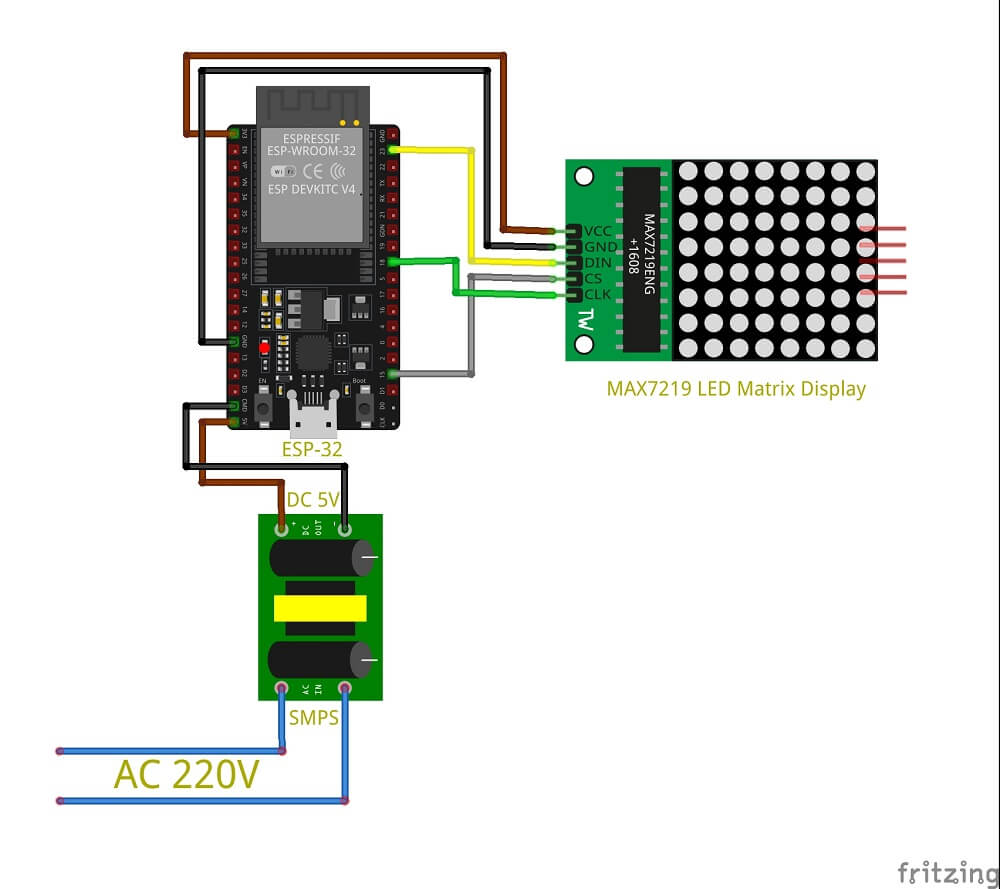
- ESP32 : Serves as the main microcontroller for receiving commands.
- MAX7219 LED Matrix Display: Displays the content sent from the microcontroller.
- Google Assistant: Acts as the voice interface for user commands.
- SMPS (Switched-Mode Power Supply): Provides power to the components.
- Connecting Wires and Breadboard: Facilitates connections between components.
H3: Recommended Software and Tools
- Arduino IDE: For coding and uploading programs to the microcontroller.
- IFTTT (If This Then That): To connect Google Assistant with the microcontroller.
- Wi-Fi Connectivity: Enables communication between the mobile device and the microcontroller.
How to Build the IoT Voice-Controlled Notice Board
H2: Step-by-Step Guide to Building Your Project
- Set Up the Microcontroller: Configure your ESP32 or Arduino UNO and ensure it is connected to a reliable power source.
- Integrate the LED Matrix Display: Connect the MAX7219 LED Matrix to the microcontroller following the wiring diagram.
- Connect Google Assistant via IFTTT: Set up voice commands that trigger actions in your microcontroller using IFTTT.
- Code Your Microcontroller: Use Arduino IDE to write and upload the necessary code for communication between the microcontroller and the LED matrix.
- Test the System: Run tests to confirm that the voice commands are updating the LED matrix display as intended.
Project Implementation Tips
H3: Best Practices for Success
- Ensure Stable Power Supply: Use an SMPS to maintain consistent power and prevent malfunctions.
- Secure Wi-Fi Connection: A strong internet connection ensures seamless communication between devices.
- Optimize Code: Ensure your code is efficient to reduce latency when updating the board.
Applications and Real-World Use Cases
H2: Where Can IoT Voice-Controlled Notice Boards Be Used?
- Educational Institutions: Used for displaying class schedules, announcements, or reminders.
- Corporate Offices: Perfect for sharing important updates or meeting schedules.
- Public Spaces: Ideal for real-time alerts or information at bus stops or airports.
- Smart Homes: Can be adapted as a smart home assistant to display daily reminders.
H3: Related Projects and Expansions
- Voice-Controlled Appliances: Extend this technology to control lights or appliances.
- IoT-Based Security Systems: Implement voice control for enhancing security protocols.
Conclusion
The IoT Voice-Controlled Notice Board is an excellent project for final-year EEE students who want to stand out. This innovative, hands-on project showcases the integration of IoT technology and voice control, making it both practical and forward-thinking. Implementing this project will enrich your engineering portfolio and enhance your understanding of the potential of IoT in modern applications.
By working on this project, you can build your skills, develop a deeper understanding of IoT systems, and make a lasting impression during your final-year project presentations.
DoFollow Links for Reference:
For more exciting projects and tutorials, check out IoT Hub Resources.

Reviews
There are no reviews yet.